
This article explains how you can archive a lost of defect tag. Tags are used for identifying the driver in the vehicle. The linked name of the tag will directly be linked to the trips in the Trip overview. Find more information about our hardware solutions in following article: FleetGO hardware overview.
Tip: Tags are available for light vehicles
Archive the tag
The steps below describe how you archive a tag. The archived tag will not be visible in your default overview of tags. You can search on your archived tags by filtering on status: archived.
- Navigate to Management > Common > Tags
- Search for the ID of your tag
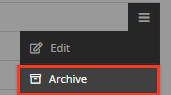
- Click the hamburger icon on the right side of the row
- Choose Archive
Tip: Archived tags can be activated by the support team of FleetGO; send us a request.
Comments
0 comments
Please sign in to leave a comment.